
Connect orders, kitchen, cash and stock so your business runs better
Organize service, preparation and closing with clear information for counter staff, front of house, kitchen and management.
Choose the business type closest to your operation
Fast orders, compact kitchen workflows, pickup and delivery in one organized operation.
View solution → Coffee shopsCounter service, tables, kitchen orders and cash control ready for peak demand.
View solution → Ice cream shopsFast sales, price lists, stock and branches connected for quicker service.
View solution → RestaurantsTables, staff, kitchen orders, delivery and invoicing in one workflow.
View solution → BarsFront of house, bar orders, shifts and cash closing with connected information.
View solution →Does any of this sound familiar?
Do orders get lost between service and kitchen?
Send detailed kitchen orders and keep every preparation status visible.
Do dine-in, counter, pickup and delivery get mixed up?
Separate channels and owners while keeping common product and cash control.
Is it hard to close a shift with reliable information?
Connect sales, payments, expenses, voids and users in one workflow.
Features for a more organized operation


Tables and staff
Organize occupancy, orders, owners and service times.

Kitchen orders and KDS
Route preparations with details and track progress on a kitchen display.

Delivery and counter sales
Centralize dine-in, pickup and delivery in an orderly operation.

Stock, cash and reports
Control supplies, payments, shifts and best-selling products.

Point of sale and kitchen orders
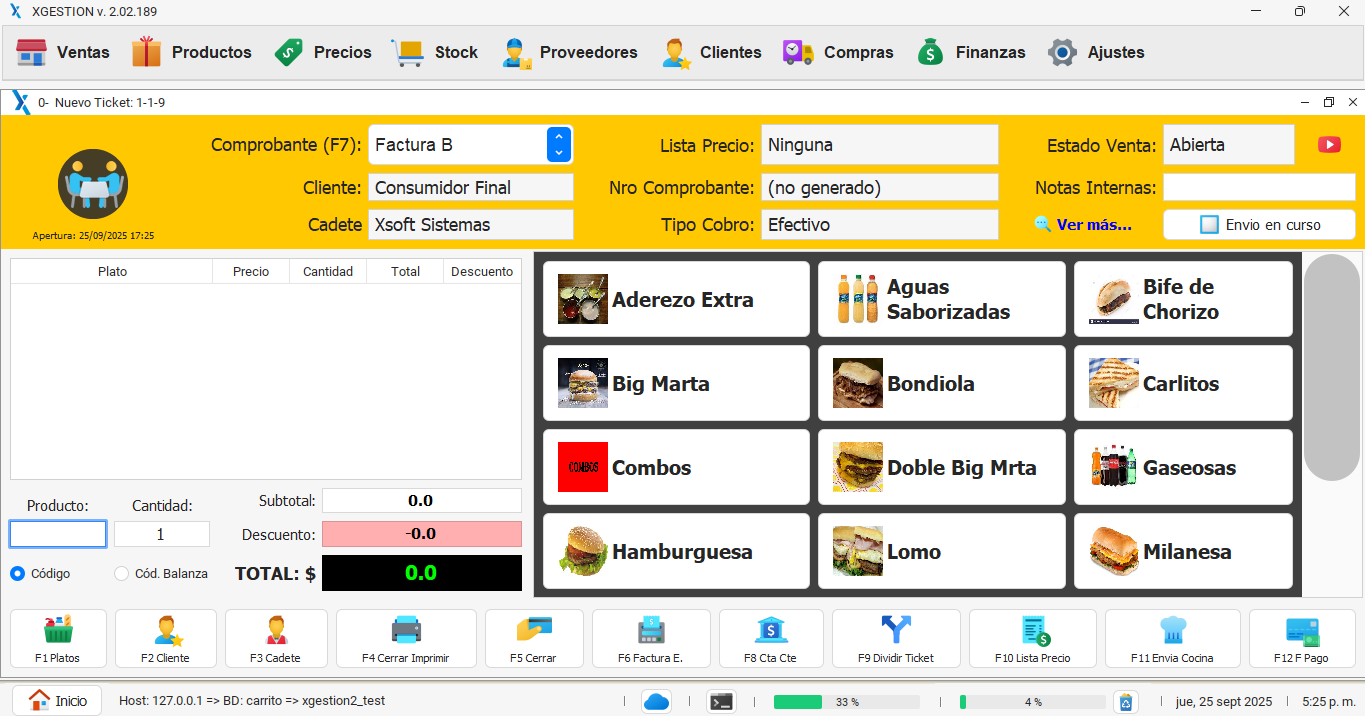
Take orders from tables, counter service, pickup or delivery and send them to the kitchen with clear notes.

Electronic invoicing
Issue the invoice when collecting payment from the same order without entering products, customers or payment methods again.
Multi-branch ingredient stock
Track ingredients, beverages and finished products by stockroom or branch, with movements connected to daily operations.

Purchases and goods receipts
Record incoming merchandise, supplies and goods receipts to keep costs and stock levels up to date.

Bulk menu price updates
Change prices by percentage or fixed amount and filter by family or category instead of editing every dish.
Price lists by sales channel
Set different prices for dine-in, counter service, delivery, customers or branches.

Customer and supplier accounts
Track balances, payments and documents for regular customers, companies and suppliers.

Food service reports
Analyze sales, best-selling dishes, peak hours, channels, staff, stock and profitability.

Shift cash closing
Reconcile sales, payments, expenses, voids and differences by register, user or shift.

Staff and permissions
Assign access to waitstaff, cashiers, kitchen staff and managers to protect discounts, voids and closings.

Offline operation
Keep taking orders, collecting payments and issuing local documents when the internet connection fails.

Multi-branch control
Centralize sales, menus, stock, registers and users across locations while keeping every operation identified.
From order entry to closing without losing information
- 1
Take the order
Record products, channel, customer or table and notes.
- 2
Coordinate preparation
The kitchen receives details and the team follows each status.
- 3
Collect and analyze
Close the operation and review cash, stock, sales and shifts.
See XGastronomía in action
Organize service, preparation and closing with clear information for counter staff, front of house, kitchen and management.
Frequently asked questions
Yes. The workflow adapts to food trucks, coffee shops, ice cream shops, restaurants and bars.
Yes. Orders can be routed to kitchen printers or displays according to the setup.
It can connect electronic invoicing, products, supplies, purchases and branch movements.
Local operation can continue according to the selected configuration.
Next step
Do we have what you are looking for?
Choose the option that best fits your business or contact us.
 Talk to an advisor